Every proposal your comfort consultants build syncs to the Management Portal, where your office runs the business.
Included with every package; you pay only per sales user.
Nothing to install.
Sign in from the office, or from anywhere with a connection.
Completed proposals (won, lost, or pending) and every form sync from the tablet to the portal, so the office sees every option, price, signature, and form without asking the rep.
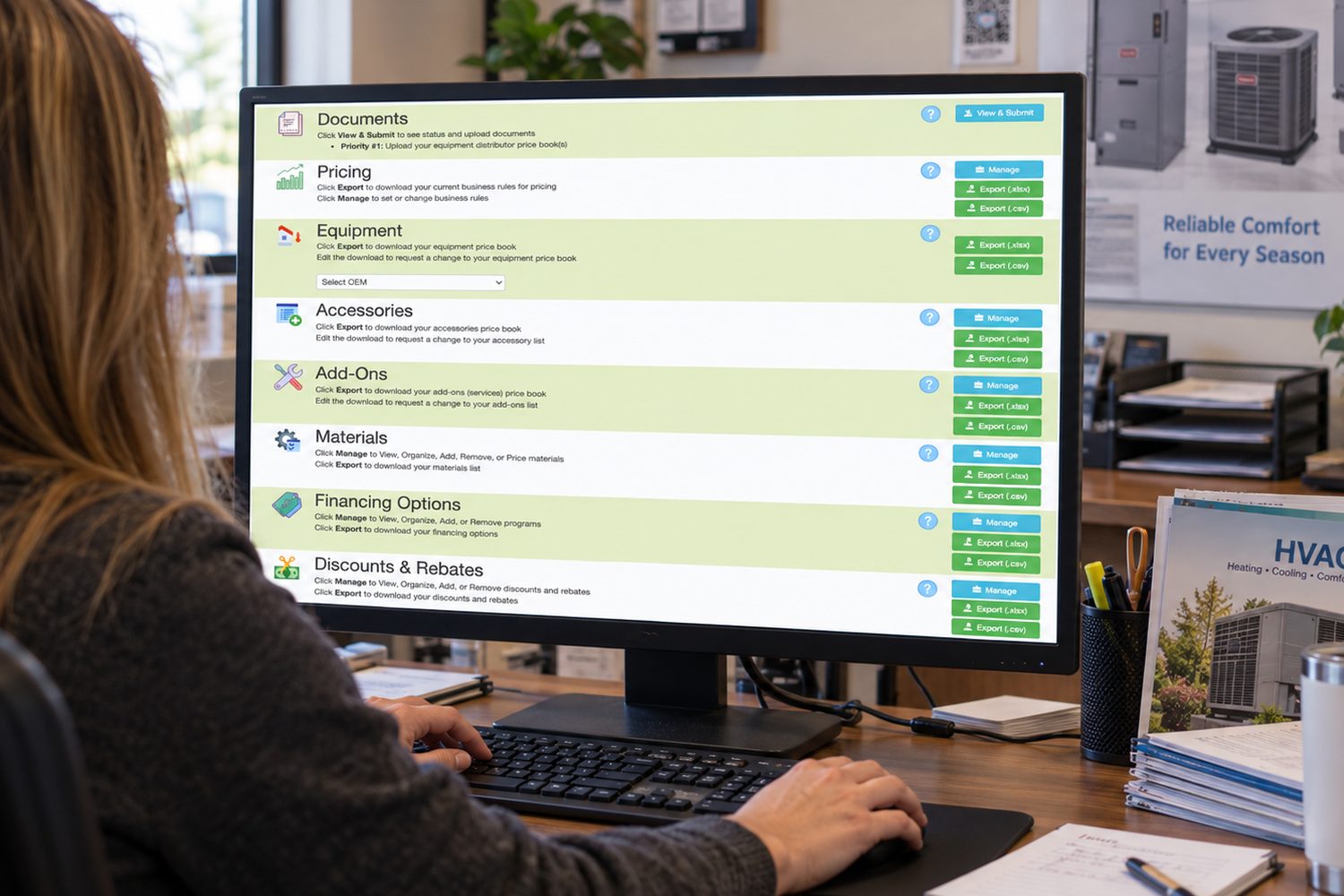
View and manage the data behind the app for your organization.
No user fee for this role.
Set and manage your margins or markups, labor rates, taxes, and Install Kit costs. The app turns them into the price on every option.
Export the rules to Excel or CSV any time.
Equipment by brand, with the OEM specs, warranties, and brochures we load. Export any list, mark it up, and send it back; we make the changes. Accessories and add-on services work the same way.
Materials you can add, price, and organize yourself.
Load the finance plans you recommend and the discounts and rebates you offer, so every proposal shows the monthly payment and the savings.
Customize what the homeowner sees: proposal settings, final notes, the Comfort Survey and your other forms, and the eSign Toolkit’s branded cart.
Your Company tab’s Why Choose Us statements, terms and conditions, and customer email involve HTML, so send us the text and we load it.
Upload price books and setup documents to cloud storage with a timestamped project history.
Check Setup Status for the number and mix of models, accessories, add-ons, materials, and finance programs loaded.
Schedule sales calls for your organization, close orders, and extend expiration dates.
No user fee for this role.
From an office PC, put a sales appointment on a comfort consultant’s tablet. Usage and Scheduling shows the scheduled sales calls from the prior twelve months.
Premium+ customers schedule through their ServiceTitan or ServMan Pro integration instead.
See every proposal as it syncs in. Mark the deal won and record how: verbal, check, credit card down payment, or email. Extend a proposal’s expiration date when the homeowner needs more time.
For the owner or sales manager.
Business Tools, analytics, and reports to run your organization.
No user fee for this role.
A dashboard of analytics and reports:
Nearly everything exports to Excel or CSV; if you love a spreadsheet, you are in heaven.
Sales Builder Pro is the only sales tool with Timeline Tracking. See what was presented in the home, in what sequence, and for how long, so coaching rests on what happened rather than what was reported.
The daily Hot and Cold report from eSign Toolkit tells your comfort consultants who to call next, and real-time notifications tell them when.
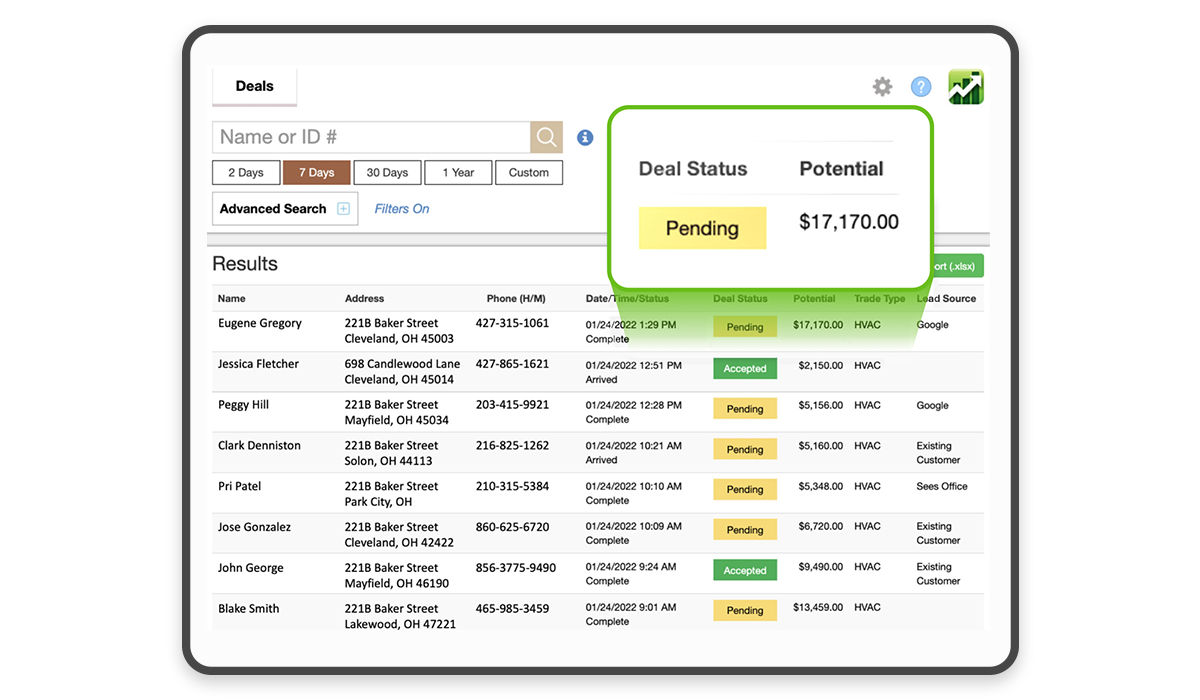
Every completed proposal in one list, with its status and potential value at a glance. Search by name or ID, and export the list to Excel.
The date filters are purpose-built for the HVAC sales cadence: 2 days for fast-moving emergency replacements, 7 days for last week’s calls at the Monday morning huddle, and 30 days for think-it-over buyers, the typical proposal expiration. Custom covers anything from one day to forever.
The call center and your sales managers keep it open all day.
For the install manager and the crew.
The job as it was sold, handed to the truck: photos, parts, piping layout, labor hours, and rollover risk.
Install Manager Pro is included for ductless and an optional upgrade for unitary and boilers.
Before the proposal is built, the comfort consultant captures the job site for the install team: the photos and job details that eliminate wasted return trips and unscheduled rollover days.
Three professionally designed Site Surveys are included, one each for unitary, boilers, and ductless, and all three can be customized.
Part of the Preferred+ and Premium+ packages.
For every sold job, Install Manager Pro lists the mandatory (required), recommended, and optional items by equipment type, each with its own labor hours, so every part is quoted, purchased, and on the truck. Export it to order equipment and parts.
Conventional jobs need no layout, since the crew runs the pipe by the shortest path or reuses the existing line set; ductless does, and for every supported brand it downloads with the bill of materials.
Sales Builder Pro is the only sales tool that rates the risk of a rollover on each job, from your standard and maximum working hours.
A job that forecasts 11 hours against a 10-hour day is flagged before it is scheduled, so you can start early, stay late, or send a stronger crew.
A won proposal is a promise. Install day is where the homeowner decides what to tell the neighbors, and the crew that arrives with the photos, the parts, the piping layout, and the hours the sale promised is the crew that finishes on the day planned.
A job that finishes on the day planned earns the five-star review, the review brings the next lead to the kitchen table, and the wheel turns again. Sales Builder Pro carries the job from the first handshake to the next one.
The best HVAC companies don’t have the best closers. They have the best sales process. This free playbook lays out one that wins at the kitchen table, or sets up the follow-up win.
Written for Comfort Consultants, Sales Managers, and Business Owners, with proven practices from our customers.
Inside, you’ll learn how to: